County filing guide
Orange County property tax review and appeal guide
Regular decline-in-value appeals. Supplemental and escape assessments have different deadlines.
Filing options
Current county filing details have not loaded yet.
These steps explain the regular decline-in-value review and appeal process. They do not confirm that filing is open or that a submission method is currently available. Before filing, check the county’s current window, fees, forms, and submission instructions.
Filing instructions
Informal review
Procedural reference — confirm current availability before filing.
Informal review addresses the upcoming assessment roll, not prior assessment years. The county-hosted form remains useful for preparation when the request window is closed.
Open the Orange County Assessor’s forms page and find Request for Informal Assessment Review.
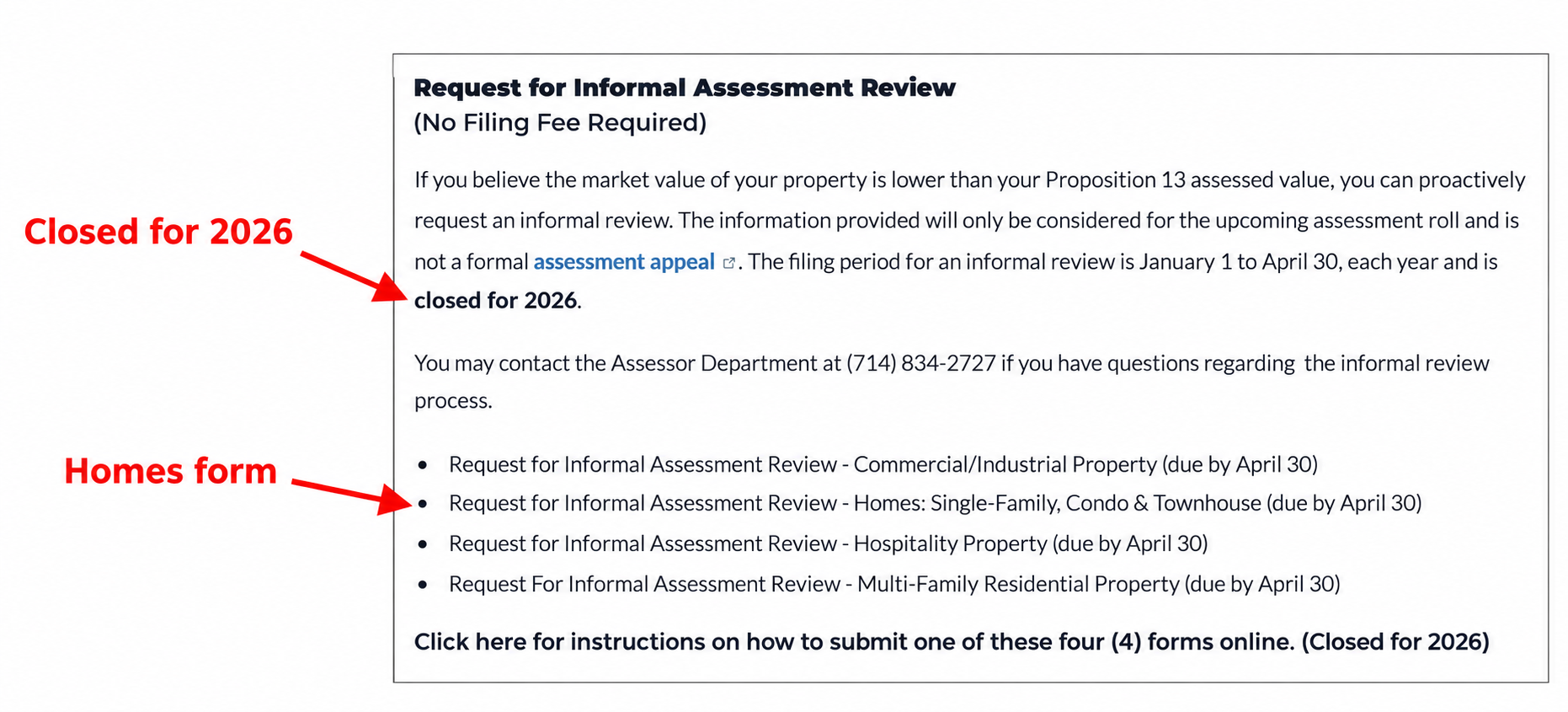
Informal review section showing the Homes form and 2026 closure notice Open the county-hosted residential review form. Select Single Family, Condo, or Townhouse. Use the latest county version available.
Enter your name, daytime phone, representation status, parcel number, property address, purchase date, and purchase price. Add agent details only if applicable.
Enter your opinion of value as of January 1 of the review year.
Complete the comparable-property table. It has three rows for nearby sales or listings: address, APN if known, sale date, price, and relevant details. The form specifies sales no later than March 31 and allows additional information on a separate sheet.
Sign and date the owner’s signature line, leave Assessor Use Only blank, and keep a copy.
Submit during the filing window using the county’s current submission instructions. The assessor’s published overview documents mailing to Orange County Assessor, Attention: Real Property, P.O. Box 22000, Santa Ana, CA 92702-2000.
Review the result on your July Property Value Notice or property tax bill. If you disagree, follow the separate formal appeal process in Part 2.
Formal appeal online
Procedural reference — confirm current availability before filing.
Open the Orange County online assessment appeal portal (ODESY). Click Register to create an account. If you already have one, enter your username or email and password, then click Sign in and skip step 2.
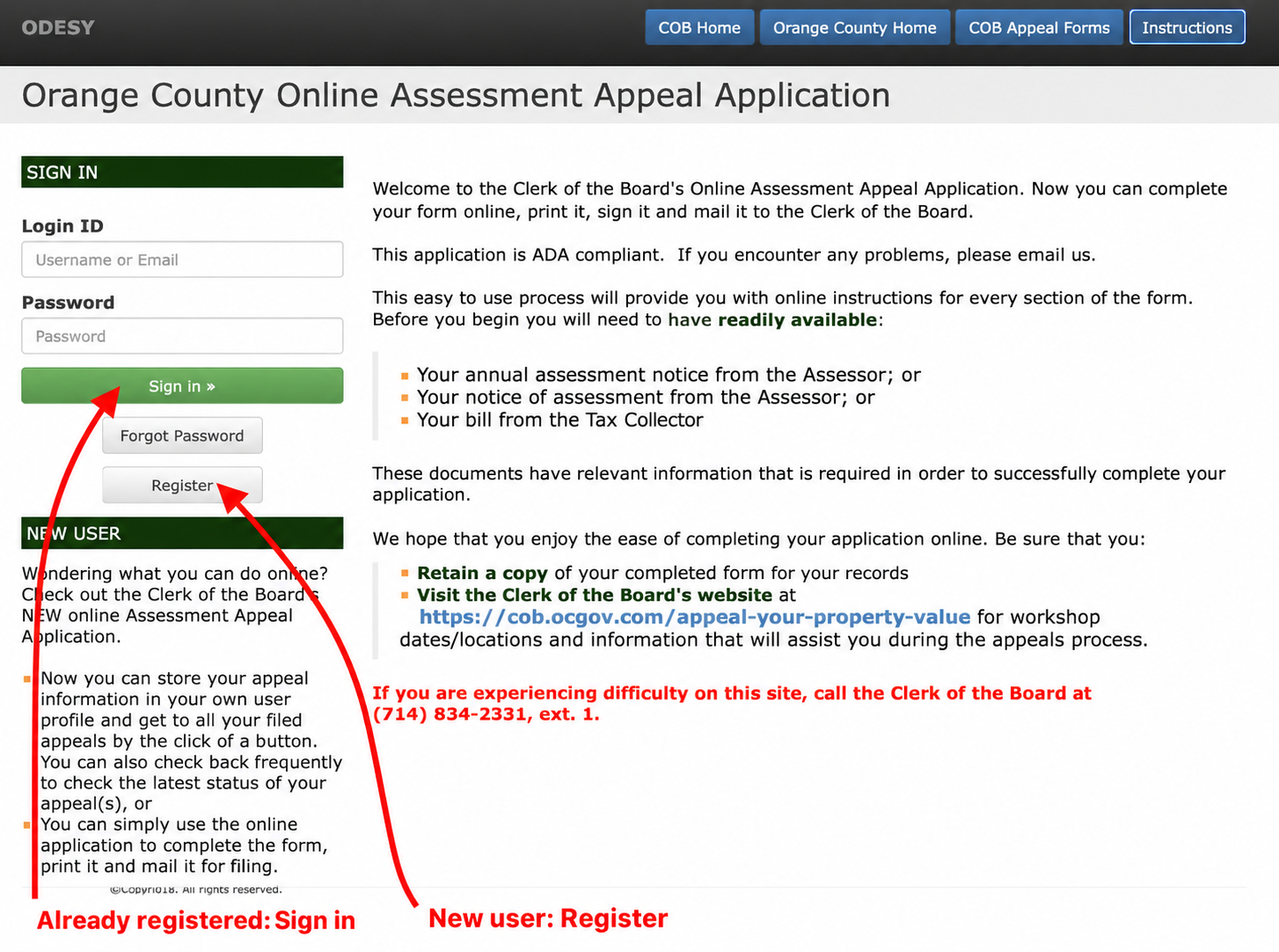
Register or sign in to Orange County’s appeal portal Complete the required contact, account, and security fields. If you are the property owner filing for yourself, select Owner under User Type, then click Register. Use your account to sign in to the portal.
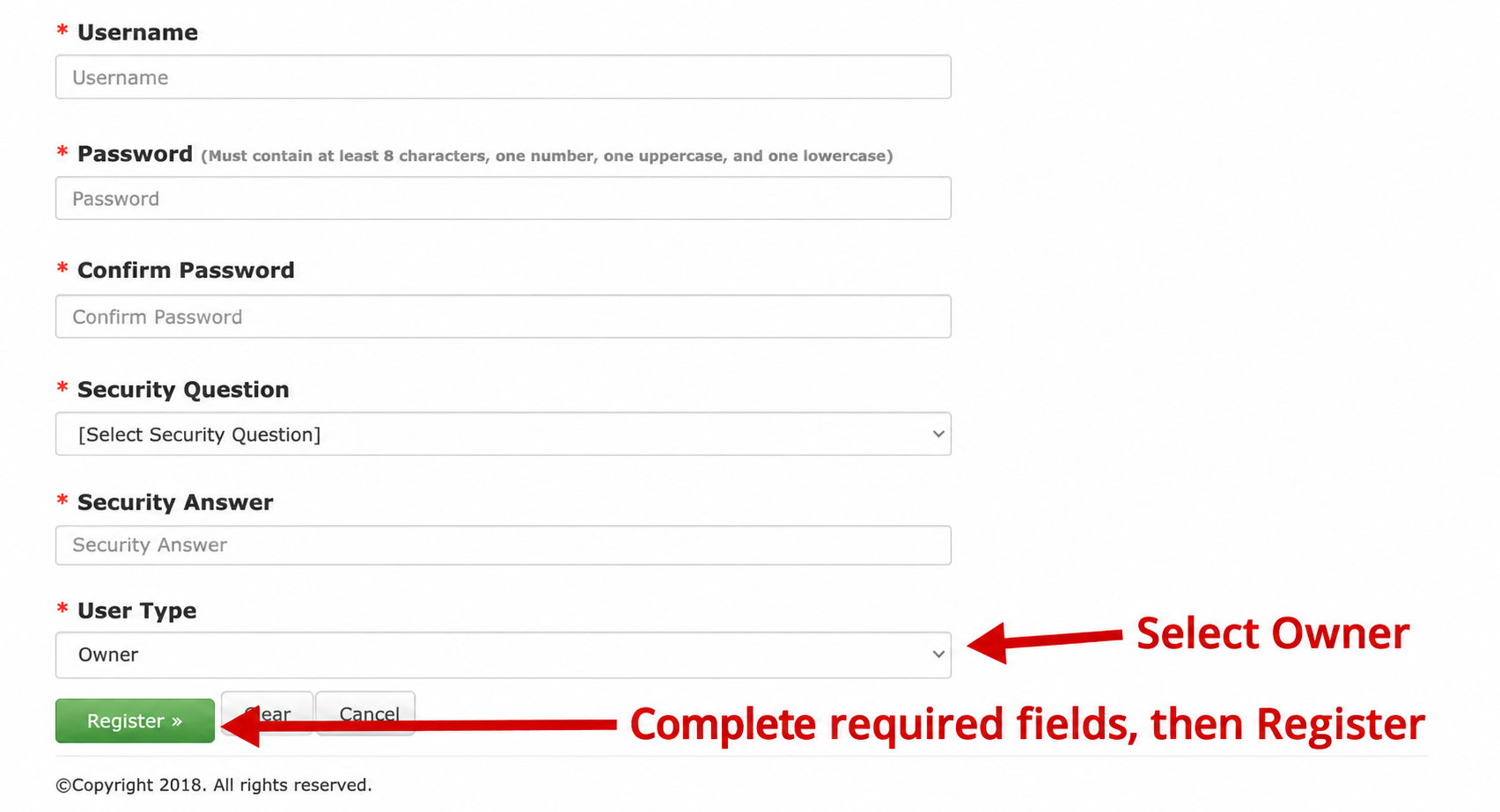
Select Owner and complete registration Begin an assessment appeal application in your account and follow the portal’s instructions. Have your annual assessment notice or tax bill available.
Enter the applicant’s name and mailing address, the property address, and the eight-digit Assessor’s Parcel Number (APN). Use the assessment year you are appealing; each parcel and year needs a separate application.
Enter the assessed values shown on your notice or bill and your opinion of value as of January 1, details not loaded in the applicable categories. Leave the Board Use Only column blank.
For an annual decline-in-value appeal, select Regular Assessment as the assessment type and Decline in Value as the reason. These choices apply to the regular annual assessment covered by this guide.
Complete the remaining questions using the county’s application instructions. Upload any required notices or authorization documents. Keep your comparable-sales evidence for the hearing; the county’s instructions say not to attach hearing evidence to the application.
Review the application, follow the DocuSign signing prompts, and complete electronic submission before the filing deadline. Keep a copy and the unique appeal application number issued for the completed submission. Creating an account or saving an unfinished application does not complete filing.
After you file
Informal review
Keep your request confirmation and correspondence. Confirm current deadlines with the county.
Formal appeal
Keep a copy of your application and filing confirmation. Watch for notices from the Clerk of the Board and follow the county’s instructions for any hearing.
Open my appeal plans →Contacts & sources
Current county contacts and live fact citations will appear when filing details load.
Sources
Informal sources
- Assessor’s review overview — filing window, fee, review year, mailing instructions, and value notice (checked September 29, 2026).
- Assessor’s forms page — property types, closure notice, and reference to online submission (checked September 29, 2026).
- Residential review form — preparation steps, comparable-property information, and signature requirements. Revision January 2023; use a newer county version if available (checked September 29, 2026).
- Verification scope: The public forms page was inspected and captured in the screenshot. The PDF remains accessible despite the removed links, and the preparation steps are based on that form. The online submission instructions link is currently removed. An underlying online portal and its submission flow could not be verified; removed links alone do not establish that a portal has shut down.
Formal sources
- This guide covers regular decline-in-value reviews and appeals. Supplemental and escape assessment notices follow different deadlines. Follow the county’s current instructions if they differ from this guide.
- County appeal page — 2026 filing window (checked September 29, 2026).
- ODESY portal — public sign-in and registration screens (inspected September 29, 2026).
- Application instructions — applicant details, values, assessment type, and evidence (checked September 29, 2026).
- Assessment Appeals Board rules, approved October 28, 2025 — electronic filing and ODESY, PDF pages 7–9 and 29 (checked September 29, 2026).
- County FAQs — no filing fee (dataset check July 11, 2026).
- State Board of Equalization’s 2026 filing-period notice — statewide annual appeal-window rules (dataset check July 10, 2026).
- Clerk contact page — Assessment Appeals Division address and phone (dataset check July 11, 2026).
- Verification scope: The public sign-in and registration screens were inspected. Steps 3–8 summarize the county’s published instructions and rules; the application screens behind sign-in were not inspected. The portal homepage still describes printing and mailing, but the county’s current rules expressly allow electronic filing through ODESY with DocuSign.