County filing guide
Riverside County property tax review and appeal guide
Regular decline-in-value appeals. Supplemental and escape assessments have different deadlines.
Filing options
Current county filing details have not loaded yet.
These steps explain the regular decline-in-value review and appeal process. They do not confirm that filing is open or that a submission method is currently available. Before filing, check the county’s current window, fees, forms, and submission instructions.
Filing instructions
Informal review
Procedural reference — confirm current availability before filing.
Open the Decline in Value Application page. In the ACR-755 owner row, select eForm Online Filing. Use the separate Agent Filing row only if you are acting for the owner.
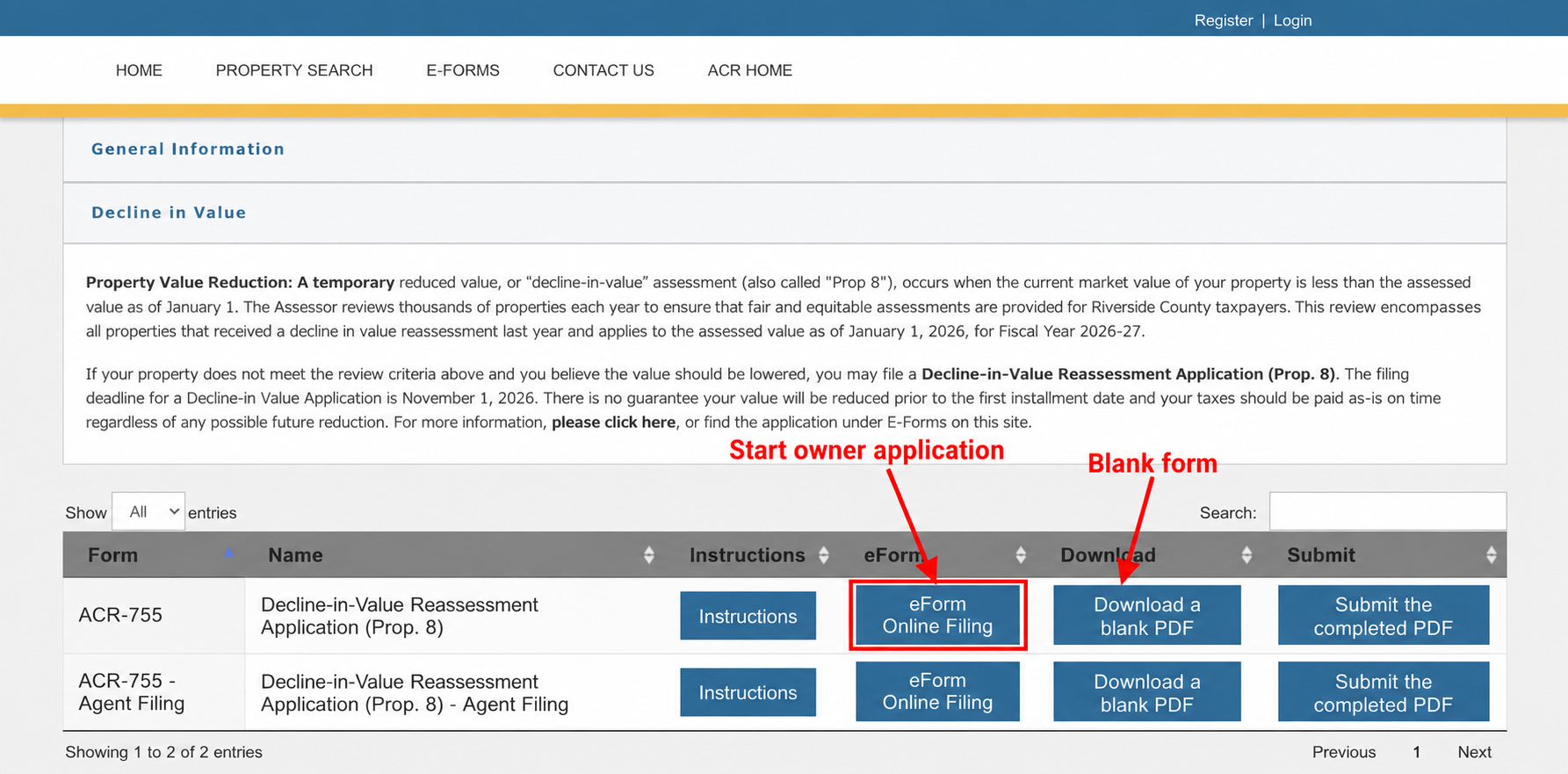
Start the owner application or download the blank form Enter your Assessment Number and select Continue. Have your tax bill or assessment notice available.
Complete the owner, property and contact details, and enter your opinion of value as of January 1, details not loaded. File one application per PIN or assessment number.
Provide two comparable sales supporting that value. The county asks for sales close to January 1, details not loaded, and no later than March 31, details not loaded. Include each sale’s address or parcel number, date, price and property description.
Complete the required fields and electronic signature, then continue to Attachments. Add supporting documents and select Continue to complete filing. Download the completed form for your records.
An informal request does not extend the formal appeal deadline. You can file a formal appeal while waiting for the Assessor’s response.
Formal appeal — prepare online and submit by mail
Procedural reference — confirm current availability before filing.
The county’s online tool prepares the application; you must still print, sign and mail it.
Open Assessment Appeals Online and select Click here to begin. Sign in, or choose I don’t have an account. Sign me up!
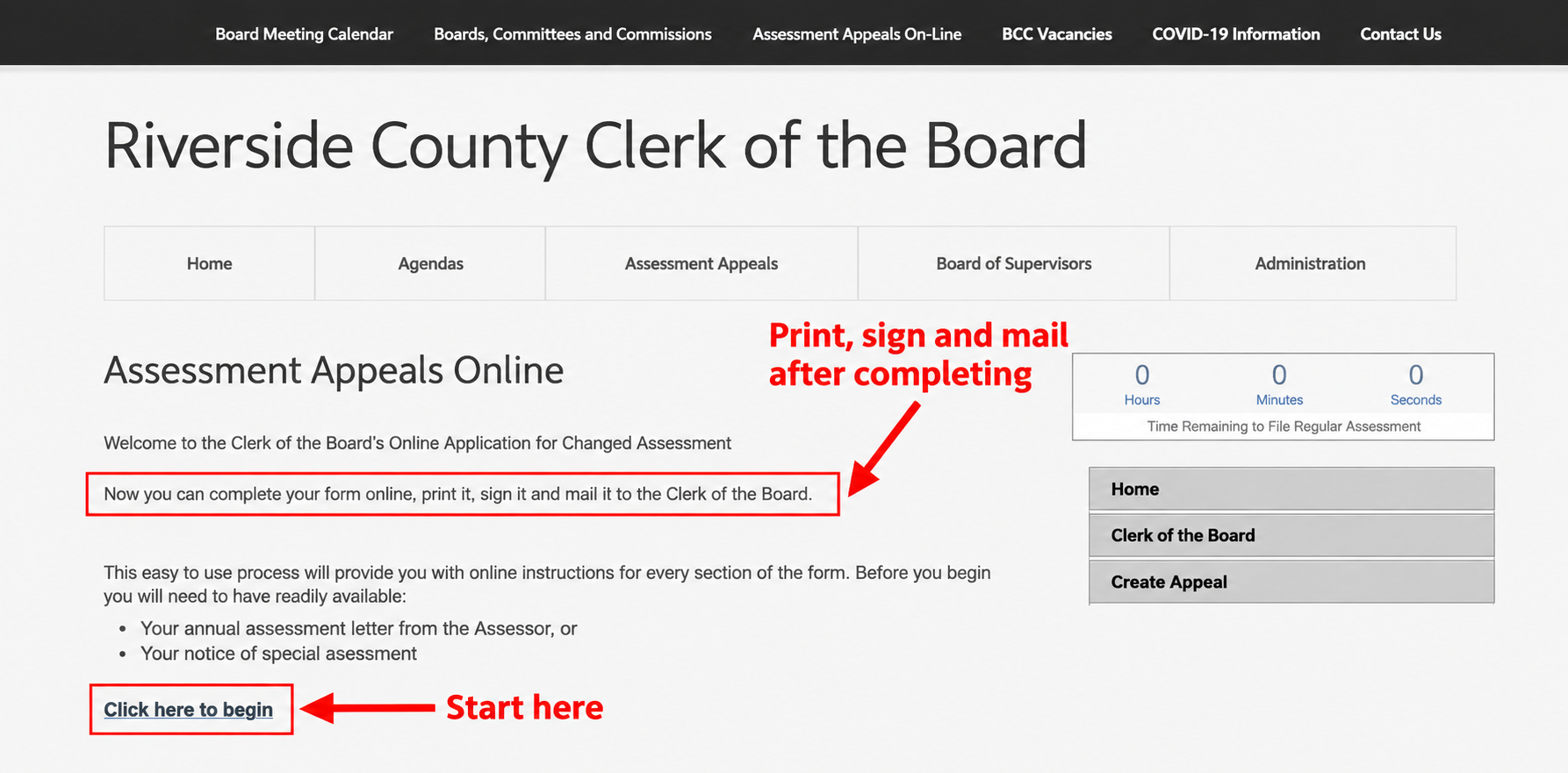
Start the online preparation tool; print, sign and mail the completed application Complete the application using your assessment notice or tax bill. Enter the applicant’s contact details, parcel number and property address. Include representation details only if someone is filing for you.
Enter the assessed values and your opinion of value in the applicable categories. Leave the Appeals Board column blank. For an annual January 1 market-value dispute, use Regular Assessment and Decline in Value.
Answer the remaining questions, including written findings and claim for refund, using the county’s application instructions. Keep hearing evidence for the hearing; do not attach it to this application.
Print and review the application. Complete the certification with your filing status, date and original signature in blue ink. Include the details not loaded fee for each application/parcel, payable to details not loaded.
Mail the signed application and fee to details not loaded before the deadline. Keep a copy and proof of mailing.
After you file
Informal review
Keep your request confirmation and correspondence. Confirm current deadlines with the county.
Formal appeal
Keep a copy of your application and filing confirmation. Watch for notices from the Clerk of the Board and follow the county’s instructions for any hearing.
Open my appeal plans →Contacts & sources
Current county contacts and live fact citations will appear when filing details load.
Sources
Informal sources
- Assessor’s Proposition 8 page — January 1, 2026 valuation date, November 1 application deadline, and written results for applications received after July 1. Checked September 29, 2026.
- Decline in Value eForms page — owner and agent routes, one application per PIN, electronic signature, attachments and completion/download instructions. Checked September 29, 2026.
- 2026 ACR-755 application PDF — the filename is old, but the linked document is revision January 2026. It specifies the owner/property fields, two comparable sales and March 31 cutoff. Checked September 29, 2026.
- County’s May 5, 2026 review notice — no fee; informal review does not extend the formal deadline. Checked September 29, 2026.
- Verification scope: The forms list and blank Assessment Number entry screen were inspected in the browser. The screenshot marks the owner eForm and PDF download. Later fields and submission steps are summarized from the current county form and published eFiling instructions; no property information was entered and no request was submitted.
Formal sources
- Clerk’s Assessment Appeals Division and online preparation tool — the tool explicitly requires printing, signing and mailing the completed form. Entry and sign-in screens checked September 29, 2026.
- Current appeal application — property/value fields, certification, blue-ink signature, $30 per application/parcel, and mailing address. Checked September 29, 2026.
- County application instructions — how to complete the form, payment payee, original signature, and hearing-evidence rules. Checked September 29, 2026.
- BOE’s certified 2026 county filing periods — Riverside: July 2–November 30, 2026. This agrees with the Assessor’s current ACR-755 PDF. The Assessor’s general Proposition 8 webpage also contains a conflicting December 1 formal deadline; this guide uses the certified 2026 date. Checked September 29, 2026.
- Verification scope: The public portal and sign-in page were inspected; no account was created. Application details after sign-in are based on the county’s current form and instructions, not an observed signed-in walkthrough. The current form specifies blue ink; the separate instructions allow blue or black, so this guide follows the form’s stricter instruction. No application or payment was submitted.