County filing guide
San Bernardino County property tax review and appeal guide
Regular decline-in-value appeals. Supplemental and escape assessments have different deadlines.
Filing options
Current county filing details have not loaded yet.
These steps explain the regular decline-in-value review and appeal process. They do not confirm that filing is open or that a submission method is currently available. Before filing, check the county’s current window, fees, forms, and submission instructions.
Filing instructions
Informal review
Procedural reference — confirm current availability before filing.
Open the Assessor’s Proposition 8 page. Under FAQs, expand How do I apply for a Decline-In-Value assessment? and download the ARP-068 form. You can also open the PDF directly.
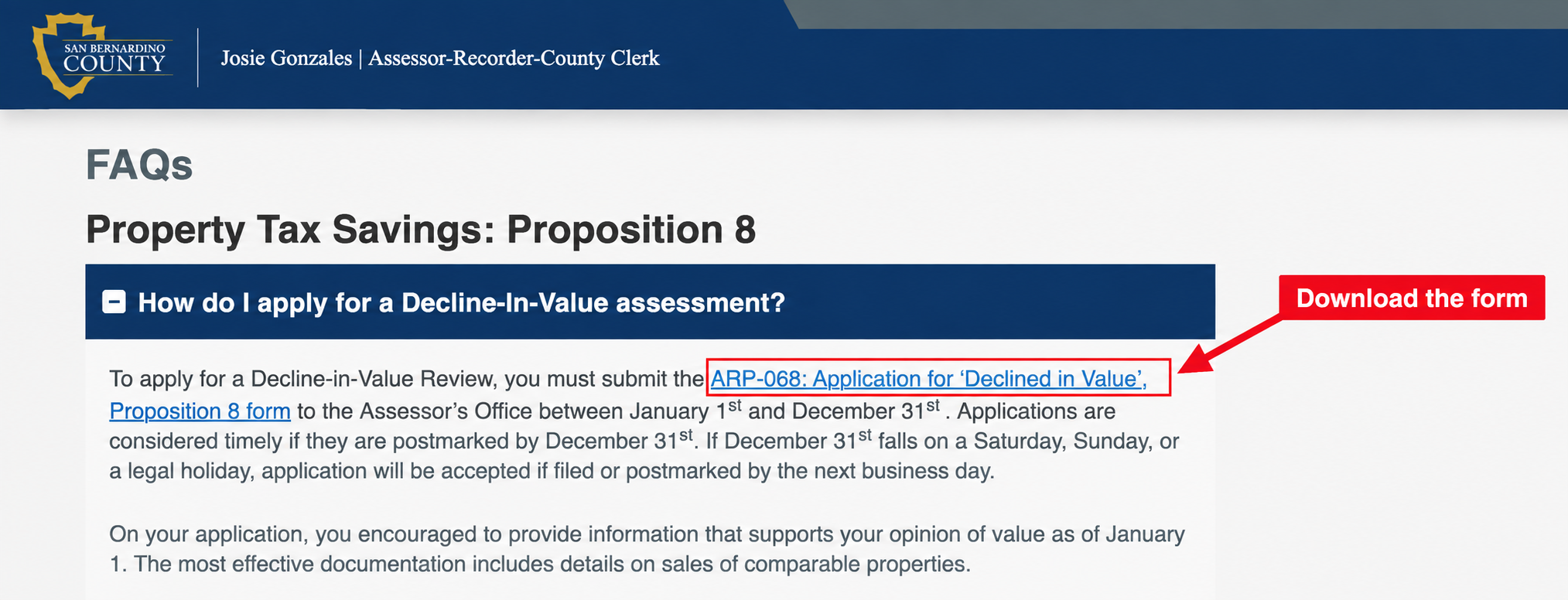
The Assessor’s FAQ links to the ARP-068 form. Enter your parcel number, name, mailing and property addresses, daytime phone, current assessment, and your opinion of value as of January 1, details not loaded. Add your purchase price and purchase date; include income and expense information if the property produces income.
Attach or list information supporting your value, such as comparable sales, an appraisal, or property-condition details. The form allows sales no more than 90 days after January 1.
Sign and date the form, keep a copy, and return it to your local Assessor’s office. Mailed requests must be postmarked by details not loaded. The Assessor sends the result by mail.
An informal request does not replace a formal appeal. The details not loaded regular formal filing deadline is details not loaded.
Formal appeal — start online, finish with signed paper
Procedural reference — confirm current availability before filing.
Completing the online portion does not remove the county’s signed-paper and fee requirements. Follow the completion instructions shown with your reference number.
Open the county’s Appeal Filing Types page and select Submit a Regular Assessment Appeal.
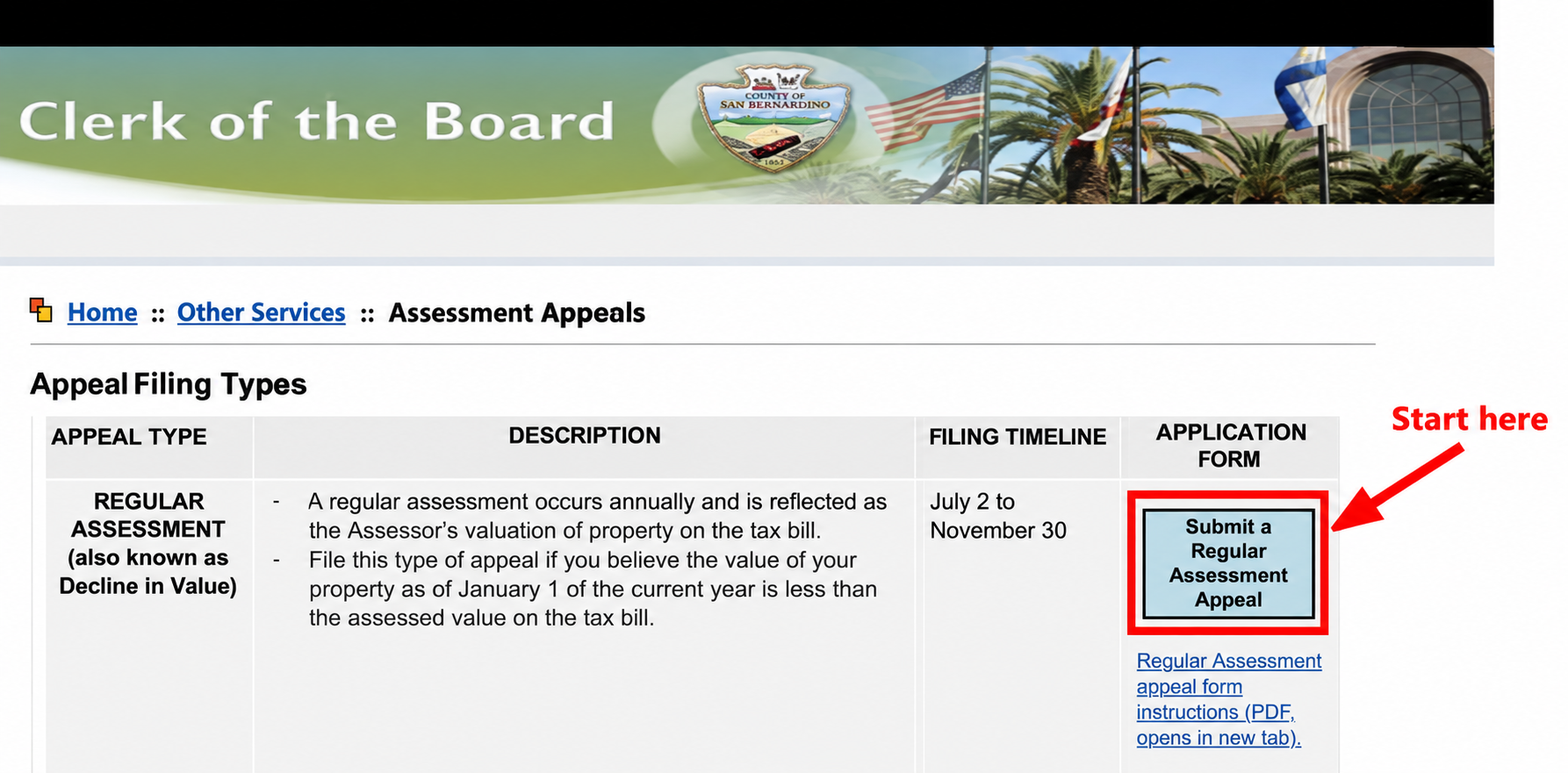
Select Submit a Regular Assessment Appeal. On Parcel, enter your parcel number and property address from your tax bill, the roll year, and other applicable details. Select the ownership type and choose Next.
Complete Applicant with your name, mailing address, daytime phone, and the signer’s relationship to the applicant. Add representative details only if applicable, then continue.
In Property, choose the property type and enter the assessed values and your opinion of value. For the annual January 1 valuation, select Regular Assessment and continue.
In Facts, select Decline in Value if that is your reason. Read the application instructions before answering the findings, refund, and hearing-officer questions.
Complete Certification, preview the application, correct any errors, then select Submit Application. Keep the reference number and print the generated application.
Sign the printed application in blue ink and include the details not loaded nonrefundable fee, by check or money order payable to details not loaded, or a completed fee-waiver request. Follow the completion instructions shown with your reference number; include required notices or bills, not your hearing evidence.
Mail or deliver the signed original and fee or waiver to Clerk of the Board of Supervisors, details not loaded within the filing period. Keep a copy and proof of delivery or mailing. If the confirmation’s requirements are unclear or the application does not print, call details not loaded before treating the filing as complete.
After you file
Informal review
Keep your request confirmation and correspondence. Confirm current deadlines with the county.
Formal appeal
Keep a copy of your application and filing confirmation. Watch for notices from the Clerk of the Board and follow the county’s instructions for any hearing.
Open my appeal plans →Contacts & sources
Current county contacts and live fact citations will appear when filing details load.
Sources
Informal sources
- Assessor’s Proposition 8 page and FAQ — free review, January 1 valuation, December 31 deadline and postmark rule.
- ARP-068 application, revision January 2025 — requested information, supporting evidence, signature, return to the local Assessor, and mailed result.
- Assessor office locations — choose the local office for the return address.
- Checked September 29, 2026. The public page and downloadable form were reviewed; screenshot marks the live form link. No request was filed.
Formal sources
- Appeal Filing Types and live application — public entry and Parcel screen directly inspected September 29, 2026.
- County’s online help, dated July 2015 and still linked by the live application’s help button — later screens, preview, submission reference, and required printing. Its page 10 confirmation example states that the original must be signed and mailed; it is an older example, not a newly submitted application.
- Current application and instructions, BOE-305-AH revision May 2024 — fields, blue-ink original signature on paper applications, fee, payee, address, and no hearing evidence with the application.
- Assessment Appeals page — 2026 window, $45 fee, waiver, and Clerk contact.
- Local rules, listed by the county as amended May 20, 2025 — online submission is an allowed channel, while a complete application requires the original signature and fee or waiver.
- Checked September 29, 2026. Later-screen guidance comes from the county’s published help and current application instructions. No personal information was entered and no application or payment was submitted. A current confirmation screen was not reached; fully electronic signature/payment completion was not verified.